How to Write an ATS-Friendly Resume (With Examples)
By: Flavored ResumeIn today’s hiring world, your resume must impress two audiences: the Applicant Tracking System (ATS) and the human recruiter.
An ATS-friendly resume ensures that your experience, skills, and keywords are read correctly by software, increasing your chances of being shortlisted.
According to Select Software Reviews, 88% of employers believe they lose out on top candidates because their resumes aren’t ATS-compatible. That means formatting, structure, and word choice all matter more than ever.
This guide will walk you through how to write an ATS-friendly resume in 2025, with examples and data-backed advice from top hiring experts.
Understanding the ATS: What It Does and Why It Matters
An Applicant Tracking System (ATS) collects, sorts, and filters applications so recruiters can review only the top matches.
Resumes that don’t align with its parsing logic—or lack the right keywords—can be rejected automatically before a human ever sees them.
A Robert Half report highlights that the majority of companies rely on ATS to rank applicants based on keyword relevance and formatting.
Jobscan’s research further found that reverse-chronological format is the most ATS-friendly because it follows a standard order easily recognized by the software. (Jobscan)
1. Keep the Format Simple and Structured
Creative designs might look nice, but they confuse machines.
ATS tools often fail to read tables, graphics, columns, or text boxes. The University of Illinois Career Services recommends avoiding nonstandard formatting and sticking to:
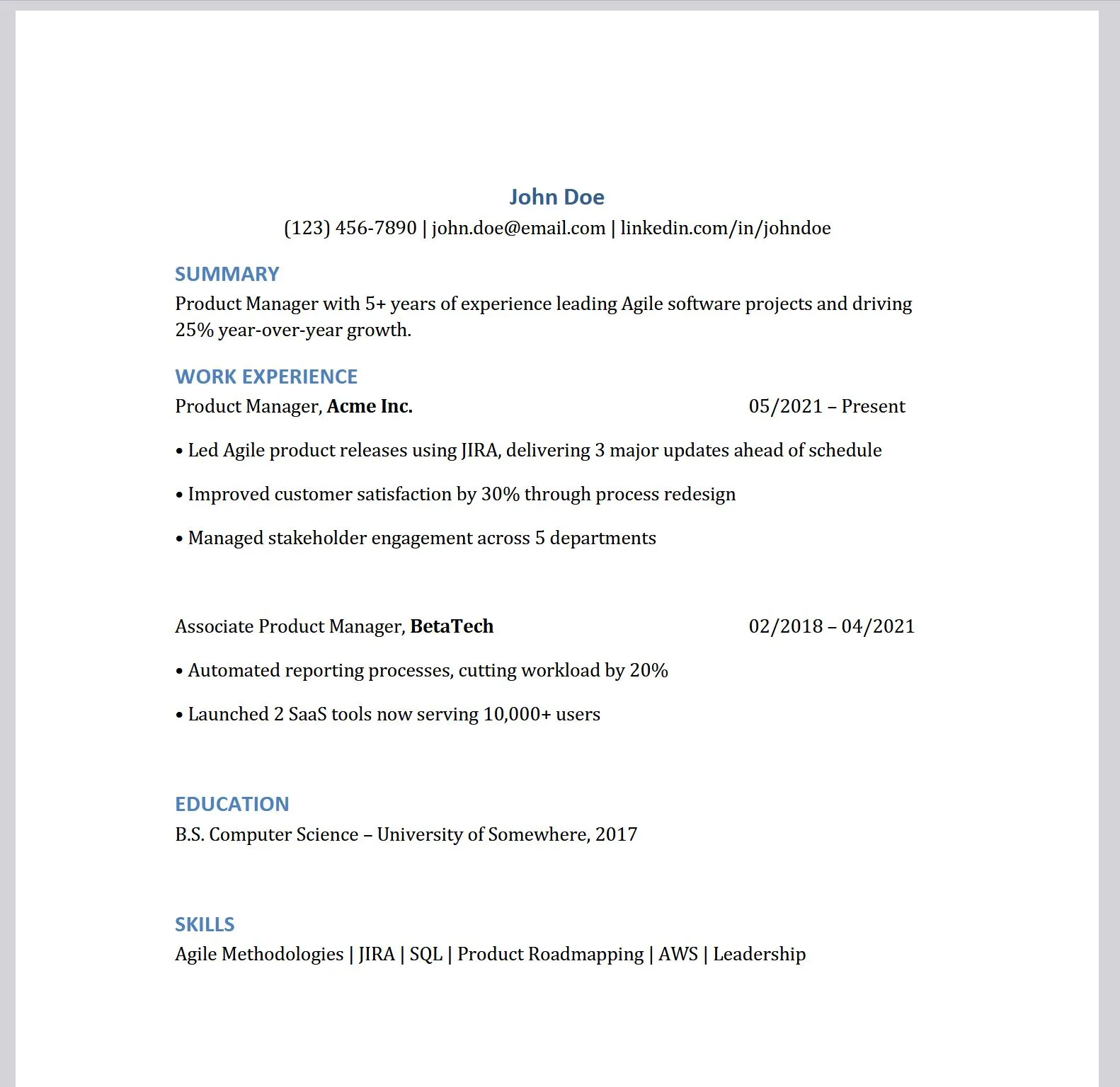
- Single-column layouts
- Standard fonts: Arial, Calibri, or Times New Roman
- Clear headings: “Work Experience”, “Education”, “Skills”, “Certifications”
You can still look polished—just don’t sacrifice readability for aesthetics.
2. Choose the Correct File Type
Not all ATS software parses PDFs correctly. Some prefer Word documents (.doc or .docx).
If the job posting doesn’t specify, submitting a .docx file is safest. However, if PDFs are allowed, ensure your version is text-based (not scanned or image-based).
According to TopResume, submitting the wrong file format is one of the top 3 reasons for instant disqualification.
3. Avoid Headers and Footers for Key Info
It’s tempting to place your name and contact info in the header, but most ATS systems can’t read those areas.
Keep all vital details—name, phone, email, and LinkedIn—in the body of the document, preferably at the top.
4. Use Recognizable Headings
Stick with clear, conventional section names. Avoid creative phrasing like “My Journey” or “Where I’ve Worked.”
ATS programs are trained to identify standard headings such as:
- Summary
- Work Experience
- Education
- Skills
- Certifications
(Indeed)
5. Optimize for Keywords Naturally
Keyword optimization is crucial. Recruiters and ATS tools use specific terms to match job descriptions.
A Robert Half study emphasizes including both acronyms and full terms (e.g., “SEO (Search Engine Optimization)”).
Avoid keyword stuffing—integrate keywords organically into bullet points.
Example:
“Led cross-functional Agile projects using JIRA to deliver three major releases, improving stakeholder satisfaction by 30%.”
This approach blends keywords with measurable impact.
6. Quantify Your Achievements
Strong resumes use numbers to validate impact.
As Microsoft Create notes, quantifying results (e.g., “increased efficiency by 20%”) helps both ATS ranking and human appeal.
Use action verbs and metrics:
- Increased sales by 18%
- Reduced costs by $10K annually
- Improved retention rate by 12%
7. Maintain Readability and Consistency
Readable resumes are scannable resumes.
Use:
- Bullet points (not long paragraphs)
- Consistent date formats (MM/YYYY)
- Logical order: most recent experience first
A Huntr report warns that overly dense text blocks are among the top reasons recruiters stop reading.
8. Test Before Submitting
To confirm ATS readability:
- Copy and paste your resume into Notepad to see if it remains structured.
- Use tools like Jobscan to test your score and keyword match.
If your text appears disorganized or missing, the ATS will likely reject it.
ATS-Friendly Resume Example
Correct Example
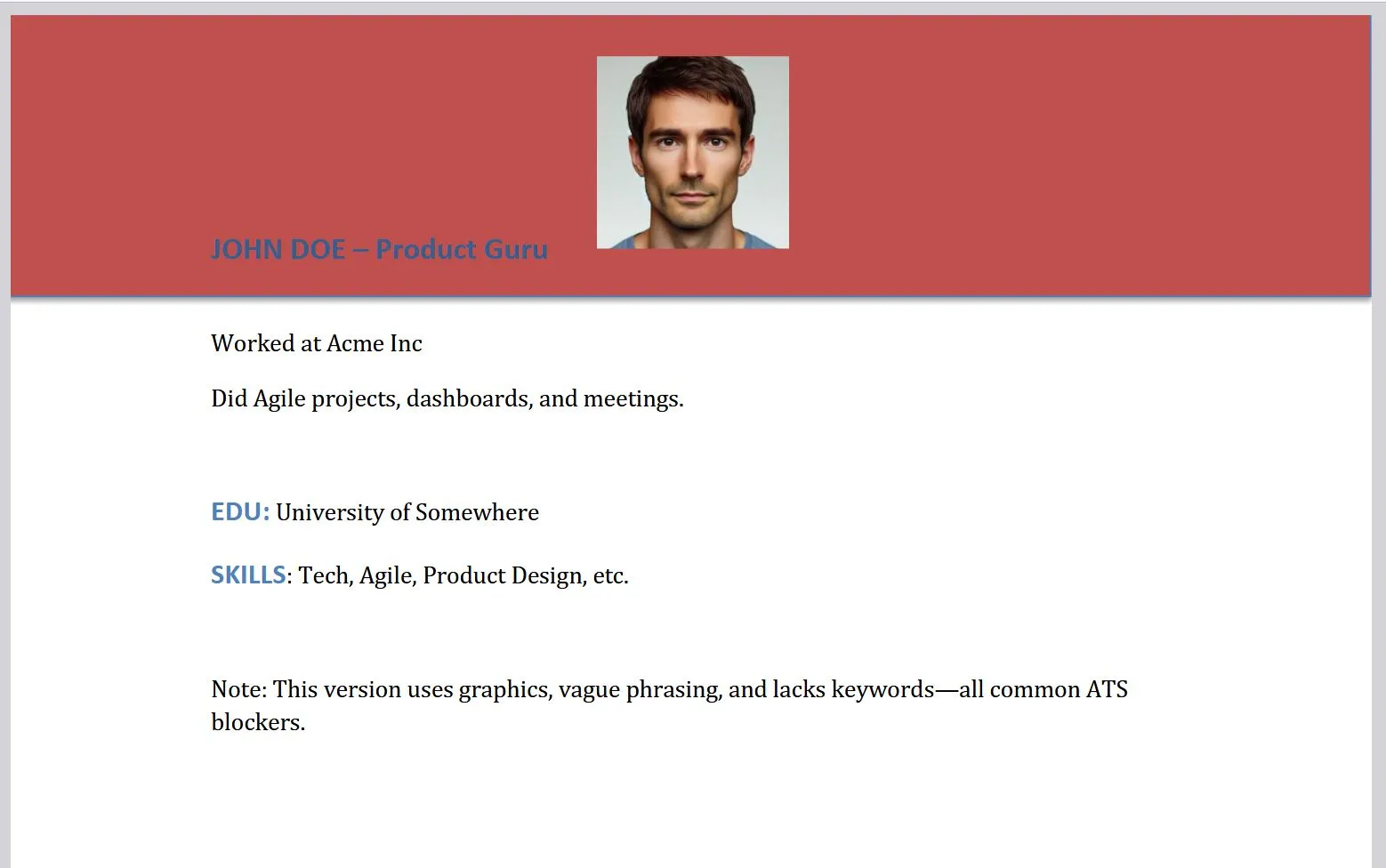
Incorrect Example
Common ATS Resume Mistakes to Avoid
❌ Using images or icons for contact details
❌ Adding text in columns or tables
❌ Overstuffing keywords unnaturally
❌ Using creative headers (e.g., “Career Journey”)
❌ Submitting a scanned PDF or image-based file
❌ Including personal data (age, gender, photo) in U.S. applications
Microsoft Create warns that resumes with graphics or “creative templates” have a much higher rejection rate.
9. Double-Check Everything Before You Apply
Run through this pre-submission checklist:
- Used standard headings
- Contact info visible in main body
- Saved in .docx or approved PDF format
- No tables or graphics
- Keywords included naturally
- Metrics added to experience bullets
- Layout verified via plain text
- Proofread for typos and grammar
Your resume should look clean in both Word and plain text form.
The Big Picture: Why ATS Compatibility Matters
According to Select Software Reviews:
- 73% of recruiters admit losing qualified applicants to poor resume formatting
- Over 90% of large companies use ATS for initial filtering
- 200–300 applications per role often pass through these systems
Without ATS optimization, even the most talented candidates may go unnoticed.
Final Takeaway
An ATS-friendly resume isn’t about dumbing down design—it’s about clarity and compatibility.
By following these best practices, you’ll ensure your resume:
✅ Passes parsing software
✅ Aligns with job-specific keywords
✅ Impresses recruiters on first glance
In 2025, the resumes that win aren’t the most artistic—they’re the most readable.